Track
Track
 Login
Login


Is there an option to withdraw from e-invoicing?
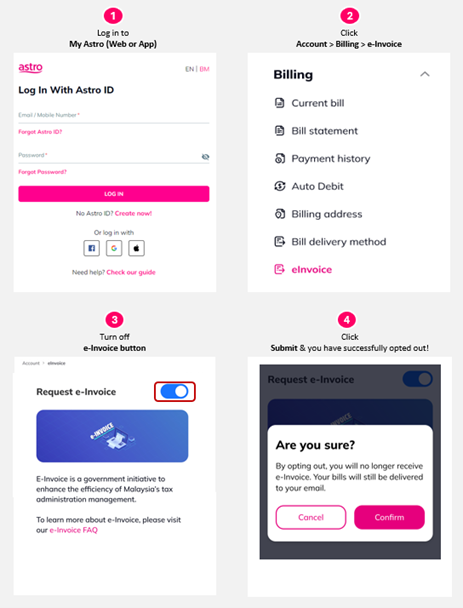
As e‑Invoicing supports quicker processing, smoother transactions and a more seamless billing and tax compliance experience over time, we highly encourage customers to stay opted in. It also makes it much easier for you to keep proper records for tax relief claims. If you still wish to stop receiving e‑Invoices, you can opt out through the My Astro website or the My Astro app.
On the My Astro website:
- Log in using your Astro ID.
- Click Bills, scroll down to e-Invoice, and toggle it off.
- Please click Confirm to ensure that the changes has taken place.
On the My Astro app:
- Log in using your Astro ID.
- Tap your account number or the default profile icon at the top left.
- Scroll down to the Billing section, select e-Invoice, and turn the toggle off.
- Please click Confirm to ensure that the changes has taken place.
Similar Articles