


 Jejak
Jejak
 Log masuk

I have activated my Prime Video access with Astro. How do I log in and watch Prime Video on my Ultra/Ulti box?
Step 1: Launch Prime Video from application rail (under HOME page)

Step 2: Once redirected to the Prime Video app, Click the “Sign-in” button to proceed.

Step 3: Pair your Ultra Box/Ulti Box by scanning the QR Code

Step 4: Sign-in using Prime Video account. If you have forgot your Prime Video username, sign in using Astro registered email or you can recover your Prime Video subscription here.
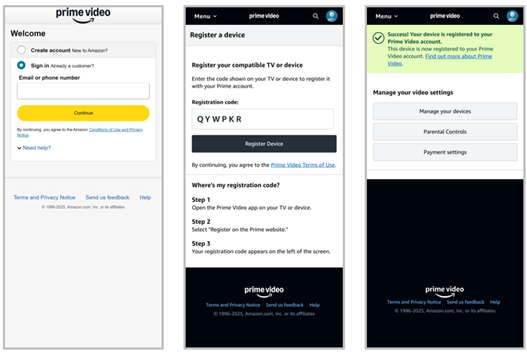
Step 5: After sign-in, choose your profile to proceed

Step 6: Enjoy watching the content!
